
How
to do Keyword Research
Nowadays effective
keyword research is an increasingly important skill for digital marketers and blogger.
Not only do they need to know how to develop a good keyword list for PPC and
SEO, but smart content marketers use keyword research to find out what topics
they should write about and what phrases they should use while writing..
There are quite a few
great, thorough keyword research guides on the internet (see Kissmetrcs here, Copyblogger here,
and Moz here). In general, they all tells you to
follow this simple process:
1. Create a seed list of starting terms
2. Expand your list using keyword research tools
3. Refine your list with competitive research
But you must’ve tried
this process and I’m guessing it didn’t actually work for you. Right? That’s
why am I adding one more article to understand this whole process. Because I
want to introduce you to a framework for categorizing keywords that I found
when I was hanging around the blogs.

The idea behind this
model is that different keywords represent different levels of interest
and intent; some search terms are used by people close to a conversion,
while others are used by people still in the early stages of research.
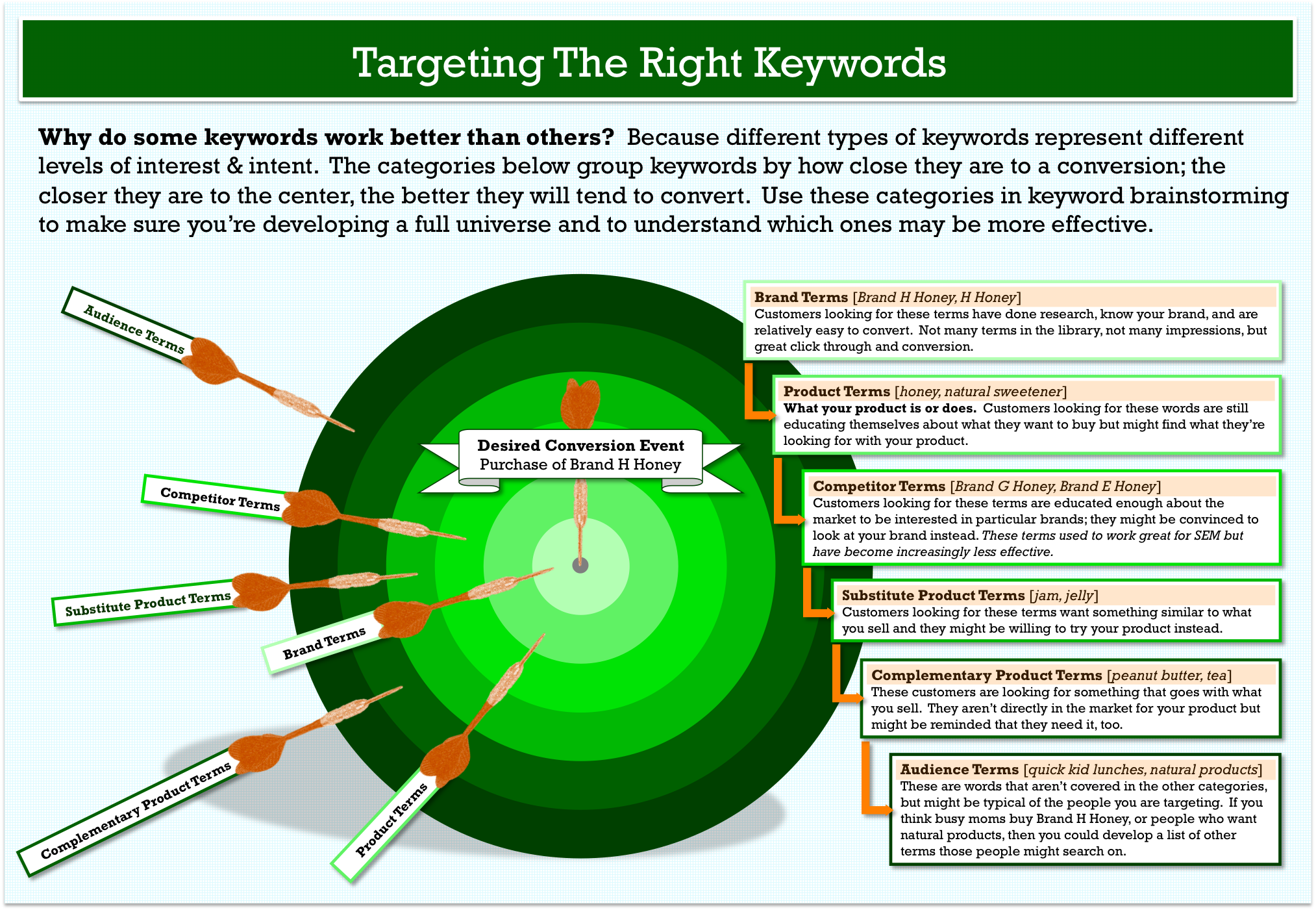
The model imagines
that your desired conversion event is the center of a target. Keywords are categorized by type and
arranged by how effective they are at converting. As a rule, it makes sense to
invest the most time and money in keywords closer to the bullseye. Only after
you have fully maximized the volume from those should you move further out.
1. Brand terms. People who are familiar with your brand
already are the easiest of all to convert. In terms of volume, this category of
keywords might not produce the most impressions or page views, but they usually
will have the best conversion rate (in both paid and natural search).
2. Product terms. This is what your product is or does and
what problems it solves. Depending on how diverse your array of products or
services is, this list could be huge. People who are searching for these terms
are a little further back in the decision cycle, and your cost per action (CPA)
on these terms usually will be higher than on brand terms. But you can get only
so much volume from brand terms, so eventually you’ll want to start winning
with product terms, too.
3. Competitor terms. There was a time earlier in the life of
paid search marketing that competitor terms were second only to brand terms for
conversion rate and CPA efficiency. However, in recent years, Google has
tightened up their quality score requirements; and now it is nearly impossible
to find a reasonable cost per click (CPC) on competitor terms. If you have
money to spend and are trying to make inroads against a strong competitor,
these could be good terms for you.
4. Substitute product
terms. This is
something someone might use instead of your product. For example, if you’re
selling pens, you might consider bidding on (or optimizing for) “pencils.”
As with competitor
terms, Google won’t give you a lot of credit for relevance on these terms, so
they will be more expensive to bid on for pay per click (PPC) and harder to win
for search engine optimization (SEO). However, if you’re getting all the volume
you can out of previous categories, they are worth considering.
 5. Complementary
product terms. These are things
that go with your product, such as “TV stands” if you sell TVs. Basically, they
are someone else’s product terms. You might win some marginal conversions with
them.
5. Complementary
product terms. These are things
that go with your product, such as “TV stands” if you sell TVs. Basically, they
are someone else’s product terms. You might win some marginal conversions with
them.
6. Audience terms. This category covers all kinds of other
terms that people in your target audience might be searching for. Usually the
impression volume on these words is vast, so it can be a tempting category to
try. Also, since this category is more aligned with traditional display
targeting, which is based on the interests and pastimes of the audience, you
might get a lot of suggestions from higher ups about trying these types of
words.
That’s one reason the
target model is so helpful. By understanding that these terms reveal there
isn’t much intent on the part of the searcher to discover your product, you
won’t be surprised when the terms act like display ads and generate the lowest
conversion and highest CPA of all of your words.
Using the Target Model
in Your Keyword Research
Now that you’re
familiar with the target model, here’s how it comes into play during the steps
of keyword research:
Creating your seed
list
A seed list is
your initial set of keyword ideas. Write down the six keyword categories. Then
use a combination of brainstorming and investigation (see below) to fill out
the list with keywords, spending the most time on brand and product terms.
You want this list to
be thorough in terms of capturing all the things your product does and the
problems it solves, but you don’t need to be exhaustive in coming up with
synonyms, etc. That will happen in the next step.
1. Research your
audience. What terms does
your audience use to describe your products or services? What other relevant
terms do they use in their day-to-day lives? Look at blog posts and comments,
forums, LinkedIn groups, and your own support requests.
2. Find the search
terms in use now. Use your
analytics tool, Google Webmaster tools, and your weblogs to see what search
terms people are using to get to you. If you have access to data on your
internal site search, look at those terms to see what people are looking for.
3. Get some
suggestions. Soovie is
a tool that lets you enter a keyword and see what the top autocompletes are for
a number of different search engines and other sites. It’s not worth running
every keyword through Soovie, but you might try a couple to see if you missed
anything.
4. Check out the
competition. Tools such as SpyFu or SEM Rush let
you see what competitors are bidding on. As with Soovie, there’s no need to
spend hours on these sites. But it can be helpful to put in a few competitor
names or key terms to see if there’s anything you didn’t think of.
Building your keyword
list
Now it’s time to
expand your list. Pop open your favorite keyword research tool and start
entering your keywords.
“Wait!” I hear you
saying. “What should be my favorite keyword research tool? Do you have a secret
weapon?”
Nope. Many keyword
research articles recommend a whole list of tools, but in my opinion you
can start and end with the Google Adwords Keyword Research Tool. In the
U.S., the majority of traffic comes from Google, and the proportion of PPC
traffic is even higher, so you might as well get your words – and your traffic
estimates – from the authority. A few tips for how to use it:
1. Group words by
topic. As you start
putting in your keywords, you can enter more than one keyword at a time, but
keep them topically grouped. For example, if you sell both mustard and ketchup,
you can put “mustard” and “Dijon mustard” in at the same time, but put ketchup
in separately.

2. Under Match Types,
select Exact. You can find a thorough explanation of Google match types here,
but basically Exact Match will give you the number of searches for that term
and that term only. This is a better and more conservative estimate of the
search traffic you might get from a term.
3. Under Advanced
Options and Filters, select the language and location you’re interested in. If you want only Spanish speakers from
San Francisco, set up the filters that way. The number you see in Local Monthly
Searches will reflect searches from people matching your criteria.
4. Set up your
columns. Select the
columns Competition and Local Monthly Searches. There are columns with other
data, including approximate CPC, but I never have found them as useful as
these.
5. Check off the
keywords that seem interesting; then select Download/My Keyword Ideas. This will produce a spreadsheet of your
results. The keyword ideas stay in the left column as you enter more seed
terms, so you can just download after you are finished.
Refining your keyword
list
Now that you have a
good list of keywords, it’s time to refine it and zero in on the best keywords.
This is especially important if you’re developing a keyword list for SEO, where
there is a limit on how many words you can reasonably optimize for. There
aren’t any hard-and-fast rules here; you’re generally looking to eliminate less
interesting words. Some factors to consider as you hone your list:
1. Keyword Category. If you ended up with 500 audience
keywords but only 15 product keywords, you probably can drop some of the less
interesting audience terms. Focus on the categories closest to the center of
the target.
Also, use the
categories to understand the intent of the search. In other words, if you sell
a B2B financial product, then “financial management” is a potential product
term, but “financial management jobs” is an audience term and therefore less
interesting.
2. Competition. In the online tool, Google rates keyword
competition from Low to High. In your downloaded sheet, they’ll have changed
this to a number from 0 to 1, with higher values meaning more competition.
Google’s number relates to paid search only. Moz
has a tool (available to paid subscribers) that gives a keyword
difficulty score for SEO.
These tools can help
you find words that you might have an easier chance of winning. Don’t spend a
lot of time fretting over these numbers, though. You shouldn’t be discouraged
from going after more competitive words, just understand that it might be harder.
3. Search Landscape. Enter some of your most important terms
into Google (or another search engine) and see what comes up. For example, if
you’re doing a campaign for the bath-and-body brand The Body Shop, until you
see the search results, you might not realize that “body shop” also refers to
cars.
Also, if you have a
marginal term of ambiguous meaning, it might be worth dropping it off the list.
And you can start making a list of potential negative keywords for any
off-topic results you see (that is, keywords you don’t want
your ads to appear for).
4. Semantic Grouping. As you go through your words, create a
column to group them semantically. For example, words like “free website,”
“free website creation,” and “free website tool” might be grouped under “free
website.” These tightly-connected groups of words can be used later as your PPC
ad groups. If you find a group with a large number of words, you might drop
some of the ones with a lower search count.
Many people want to
know how big their keyword list should be. This depends a lot on how big or
complex your product or service is, but it doesn’t need to be huge. Unless you
are developing a list for a large enterprise, think dozens or hundreds instead
of thousands. In PPC, you can use broad match (to capture long-tail terms) and
Google’s keyword reports (to add the effective ones to your list).
Categorizing your
keywords to capture the interest and intent of the searcher can help you
develop, refine, and analyze your list. Have you tried something similar? Let
me know in the comments.

No comments:
Post a Comment